
AutoExpreso Móvil
Technology PartnersAuto & Vehicles
3.5515.00 Reviews
- Version
- 1.0.63
- Installs
- 500.00K
- Age Rating
- Everyone
Screenshots
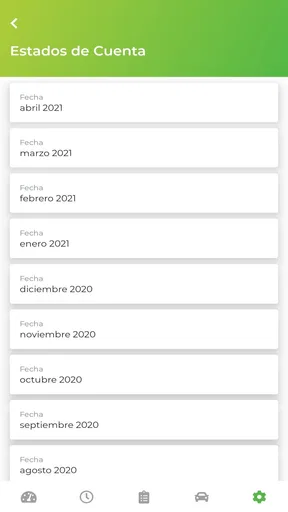
Our Review of AutoExpreso Móvil
 Analysis by Appyee
Managing highway tolls is the kind of task I prefer to finish before I leave home, not while I am already approaching a toll lane. AutoExpreso Móvil is designed for drivers in Puerto Rico who use an electronic toll account and want a mobile way to keep track of that account. I found its purpose refreshingly focused: it is not trying to be a general driving assistant, navigation tool, or car-maintenance platform. It is an Auto & Vehicles app built around one practical responsibility.
That narrow focus is also the main reason to consider it. If you regularly drive on Puerto Rico’s toll roads, having account management available on a phone can be more convenient than relying on a desktop browser, a service counter, or memory. If you never use the AutoExpreso system, however, there is little reason to install it. The usefulness depends almost entirely on whether electronic toll management is part of your routine.
What AutoExpreso Móvil is really for
The app is developed by Technology Partners and is available as a free app for Android users. It is suitable for Everyone, and the current version is 1.0.63, with Android 6.0 or later required. Those details make it accessible to many older phones, which matters for a utility app: people should not need a recent flagship device just to handle a toll account.
Its central job is to let users manage an electronic toll account in Puerto Rico from a mobile device. That wording is important. I would not approach it expecting turn-by-turn directions, traffic alerts, fuel prices, roadside assistance, or vehicle diagnostics. The app belongs beside those tools, not in place of them. Its value comes from reducing the number of steps between noticing an account issue and dealing with it.
Because it is free to access, the decision is not about whether the app itself costs money. The relevant question is whether the convenience of mobile account access is worth adding another app to your phone. The app has an average rating of 3.5 from around 2.8 thousand ratings, with more than 500 reviews, and it has passed the half-million-install mark. That suggests meaningful use while also signaling that the experience has not been universally smooth for everyone.
I see that combination as a reason to keep expectations practical. This is an account utility, not an app I would install for entertainment or exploration. A successful session may be short: open it, check the account, handle the needed task, and close it. That can still be valuable when the alternative is discovering a toll-account problem at an inconvenient moment.
The everyday situation where it makes sense
Imagine preparing for a drive across Puerto Rico early in the morning. You know you will use toll roads, but you do not remember when you last checked your electronic toll account. Instead of waiting until you are in the car, you open the app at home and review the account before leaving. If something needs attention, you have time to deal with it rather than trying to solve the problem during the trip.
That is the kind of small workflow where I think the app earns its place. It turns account checking into a routine step before a longer drive. I would make the check part of trip preparation, alongside charging a phone and confirming the route. The app does not need to be open constantly; it only needs to be available when the toll account becomes relevant.
A second useful habit is checking after a period of frequent driving. If you have made several toll-road trips, opening the app afterward can help you stay aware of the account instead of letting the balance or account status become an afterthought. The benefit is organizational rather than dramatic, but that is exactly what I want from a toll-management tool.
How the free access affects its value
AutoExpreso Móvil is free, so there is no purchase decision to justify and no paid tier I would use as the basis for recommending it. That makes the value calculation straightforward: if you have an AutoExpreso electronic toll account and use Puerto Rico’s toll roads, the app offers a no-cost mobile channel for managing something you already need to manage.
Free access does not automatically mean frictionless access. A free app can still consume time through sign-in problems, confusing screens, slow responses, or a workflow that feels less direct than the website or another official channel. I would judge it by how quickly it lets me complete the specific account task I opened it for. If it helps me confirm my situation before a trip, it has practical value. If I repeatedly need to switch to another method to finish basic account work, the fact that it costs nothing becomes less important.
There is also a difference between free app access and the financial obligations connected with using a toll account. The app is not a substitute for whatever account funding or toll charges apply to the underlying service. I would treat the app as a management tool, not as evidence that driving on toll roads is free. That distinction is easy to overlook when an app has no download price.
For someone who uses toll roads only once in a long while, the value is more limited. In that case, a browser-based account page or another established method may be enough, especially if installing an app for occasional use feels unnecessary. On the other hand, frequent drivers may appreciate having a dedicated place to check their toll account without searching for the correct page each time.
What I would do before relying on it
I would install the app well before an important trip, not at the toll road entrance. The first session is the right time to confirm that I can access my account and understand where the relevant information appears. This is a simple but important trade-off: a utility app is most useful when tested during a calm moment, rather than introduced during a time-sensitive journey.
I would also keep an alternative in mind. That does not mean the app is pointless; it means toll access is important enough that I would not make one mobile app my only plan. If the app requires troubleshooting at the exact moment I need account information, a browser or other official account channel may be a better fallback. The app’s strongest role is convenient routine management, not emergency problem-solving.
Another practical tip is to use it as part of a repeatable checklist. Before a trip involving several toll roads, I would check the account from home, confirm that the app opens normally, and then leave. After returning from a busy driving period, I would check again. This approach avoids opening the app randomly and makes its purpose clearer: preparation and follow-up, rather than continuous monitoring.
Where the experience may feel limited
The app’s focused purpose can feel restrictive if you expect a complete driving companion. It does not replace navigation, so I would still use a separate mapping app for route planning. It also does not become a general vehicle-management dashboard simply because it appears in the Auto & Vehicles category. Drivers looking for fuel tracking, maintenance reminders, parking help, or traffic information should look elsewhere.
The rating of 3.5 is a useful warning to approach the experience with patience. It is not a reason to dismiss the app, but it does suggest that convenience may vary by user, device, or situation. A toll account tool has a particularly low tolerance for uncertainty: when I open it, I usually want a specific answer or action. Any delay or unclear step feels more frustrating than it would in a casual app.
I would also avoid assuming that every account issue can be solved inside the app. Mobile access can make account management easier, but it does not guarantee that complex support questions, disputed activity, identity problems, or service interruptions will be resolved there. For those situations, the appropriate official support route may still be necessary. The app is best viewed as a front door to routine account work, not a complete replacement for every form of assistance.
Another trade-off is the dependence on a compatible phone and a working connection when the app is needed. Android 6.0 support is relatively broad, but compatibility alone does not remove the practical need to keep the device usable. I would not wait until I am stopped at a toll point to discover that the phone needs an update, the account session has expired, or the connection is unreliable.
Privacy and security are also part of the decision whenever an app handles an account. I would use a personal device, avoid sharing login details, and sign out or protect the phone according to my normal security habits. These are sensible precautions for any account-management app, especially one connected to driving and payments. They do not make the app unsuitable; they simply reinforce that convenience should not replace basic account care.
How it compares with the usual alternatives
The most obvious alternative is managing the account through a browser. A website can be preferable if you are already at a computer, need a larger screen, or only check the account occasionally. It may also feel more comfortable for tasks involving several fields or detailed account information. AutoExpreso Móvil has the advantage when the phone is the device already in your hand and you want a dedicated route to the toll account.
A service counter or phone-based support can be better for complicated cases. Human assistance is slower and less convenient for a simple balance check, but it can be more appropriate when the issue does not fit a routine mobile workflow. I would not compare those options as if one always wins. The app is for speed and access; support channels are for situations that need explanation or intervention.
General driving apps are not direct substitutes. Navigation apps can tell you how to reach a destination, but they are not automatically the right place to manage a Puerto Rico electronic toll account. Likewise, a vehicle-maintenance app may be useful for the car itself while offering nothing for toll administration. The specific advantage here is specialization, and the specific disadvantage is that specialization leaves many driving needs untouched.
For me, the best setup would be a combination: use AutoExpreso Móvil for the toll account, a navigation app for the journey, and a browser or support option as a fallback for unusual problems. That division keeps each tool responsible for the job it handles best. Trying to make one app cover everything usually creates more confusion than convenience.
Who will get the most value from it
The strongest audience is regular Puerto Rico drivers who already use an AutoExpreso electronic toll account. Commuters, people making frequent intercity trips, and drivers who want to check their account before a journey are the clearest matches. For them, the app’s free access and focused purpose can turn an occasional administrative chore into a quick phone habit.
It may also help people who manage driving responsibilities for a household. If one person normally handles the car while another keeps track of account matters, having mobile access can make that responsibility easier to perform at the moment it is needed. I would still be careful about shared credentials and would prefer that each person follow the account’s own security requirements rather than casually passing login information around.
Visitors or occasional drivers should be more selective. If you are in Puerto Rico briefly and will not use toll roads, the app is unnecessary. If you will use them repeatedly, installing it before driving may be worthwhile, but I would first decide whether your trip actually requires an AutoExpreso account and whether you are prepared to manage it. The app is not a general travel essential for every visitor.
Drivers who want a polished all-in-one motoring dashboard should skip it as their primary app. Its role is too specific for that expectation. I would also skip it if I only need directions, fuel information, parking assistance, or maintenance tracking. Those needs call for different tools, and downloading this app will not solve them.
My practical recommendation
I recommend trying AutoExpreso Móvil if electronic toll management is part of your regular driving in Puerto Rico. Since the app is free, the sensible test is not whether it is worth buying, but whether it makes your account routine easier. Install it before your next significant trip, sign in when you have time, and see whether it gives you the account access you actually need without forcing you into another channel.
Give it a fair test using a real workflow rather than a quick glance. Check the account before leaving, use it again after several toll-road trips, and notice whether it reduces uncertainty or creates extra steps. That experiment will tell you more than the install count or the category label because your decision depends on the exact account tasks you perform.
The app’s broad availability is another modest advantage. With a minimum requirement of Android 6.0, it can suit users who keep an older phone for everyday driving. I would still install it on the device I genuinely carry and rely on, not on an unused spare that may not be available when a toll-account question comes up.
Technology Partners has kept the product centered on a clear need, but the middling average rating means I would not describe it as universally effortless. My recommendation is therefore practical rather than enthusiastic: use it when its specific function matches your driving habits, but maintain a backup method for important account issues and do not expect it to replace your other driving apps.
In the end, AutoExpreso Móvil delivers its value through access, not through a large collection of extras. It is free, aimed at everyone, and relevant to a defined group of Puerto Rico drivers. For a regular toll-road user, that can be enough to justify keeping it on the phone. For everyone else, especially drivers seeking navigation or broader vehicle tools, skipping it is the more sensible choice.
Verdict
Strengths of AutoExpreso Móvil
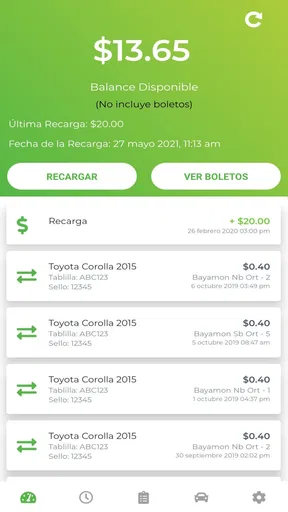
- Quickly check toll account balances and transaction history.
- Convenient access to account details while traveling.
- Useful notifications can help prevent missed payments.
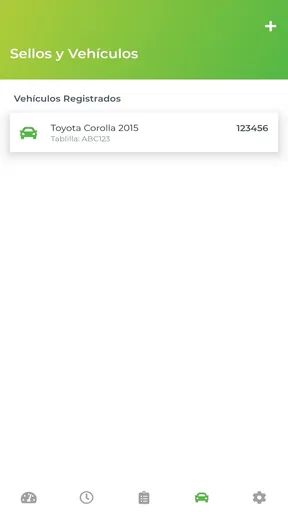
- Supports easier management of multiple registered vehicles.
- Reduces the need to use the physical toll-road service center.
Limitations of AutoExpreso Móvil
- Requires an active AutoExpreso account to access most features.
- Some functions may depend on reliable mobile data or GPS access.
- Login or verification issues can make access inconvenient.
- Not useful for drivers who rarely use Puerto Rico toll roads.
- App performance and updates may vary between iOS and Android devices.
Similar Picks in This Category
View All
Android Auto
Google LLC4.1

maxim — order a taxi & food
PT. SITO4.7

Штрафы ГИБДД: проверка с фото
Pays LLC – Штрафы ГИБДД4.7

Номерограм – проверка авто
Авто Ассист4.8

Дром Авто
Дром4.9

Frequently Asked Questions
What is AutoExpreso Móvil and what can I use it for?
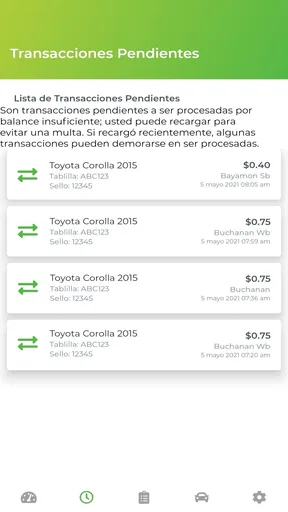
AutoExpreso Móvil is the official-style mobile companion for managing electronic toll payments in Puerto Rico. After installing it, users can generally check their account balance, review toll transactions, add funds, manage vehicles or tags, and receive account-related information from a smartphone. Its exact features may depend on the account type, tag status, and services currently enabled by the operator.
Do I need an AutoExpreso account or toll tag to use the app?
Most of the app’s useful functions are designed for people who already have an AutoExpreso account, vehicle registration, or electronic toll tag. You may be able to browse certain public information without signing in, but checking balances, recharging an account, viewing transactions, or managing vehicles normally requires account credentials. Keep your registered email, account number, tag details, and vehicle information available during setup.
Can I recharge my AutoExpreso balance through the application?
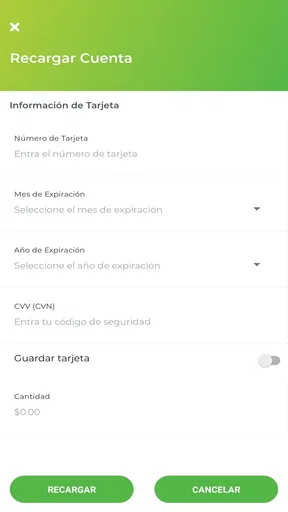
The application is intended to make account funding more convenient, and supported users may be able to add money using an available payment method such as a debit or credit card. Before confirming a recharge, carefully check the selected account, amount, and payment details. Processing times, accepted cards, minimum amounts, automatic-recharge options, and transaction fees can vary, so review the confirmation screen and your bank statement.
Is AutoExpreso Móvil safe for managing payments and personal information?
The app handles account, vehicle, toll, and potentially payment information, so users should install it only from a trusted official store and verify the publisher before downloading. Use a strong, unique password and avoid entering credentials on public or unsecured networks. Although security protections may be included, no online service is completely risk-free; keep the app updated and contact official support if you notice suspicious activity.
What should I do if the app does not show my balance, tolls, or recharge?
First, confirm that you are signed in to the correct AutoExpreso account and that your phone has a stable internet connection. Close and reopen the application, check for updates, and allow time for recently completed tolls or payments to appear, since some records may not update instantly. If the problem continues, save the transaction receipt or screenshot and contact AutoExpreso customer support through its official channels.
